 By
By 
Do you want a cheap high storage VPS? If yes, then this guide is for you.
We will see some of the amazing servers with high storage capacity at affordable prices and the best security. It will include all the necessary features that you might need in your server.
There might be many reasons why you need a virtual private server with higher storage. Some of the common reasons to get such servers include:
- Having a server for backup.
- Archiving the files.
- Storing huge eCommerce files.
- For media and zip files.
- Torrent files.
- To expand the disk space of your current server.
Or, it can be simply for a big website.
Either way, you’ll find the best servers here.



Compare these plans in a table
| Provider | InterServer | Contabo | Time4VPS |
|---|---|---|---|
| Hosting plans | InterServer | Contabo | Time4VPS |
| Disk space | 1 TB → 32 TB (HDD) | 300 GB → 1.4 TB (SSD) | 256 GB → 8 TB |
| Starting Price | $3/month | $5.28/month | €2.22/month |
Contents3
9 Cheap High Storage VPS
We will now have a quick look at the best VPS services which have a huge storage capacity. To make your work easier, I have also included the top features here. With that being said, let’s begin the list and see the storage servers.
#1 InterServer (SATA HDD, Cheapest per TB)
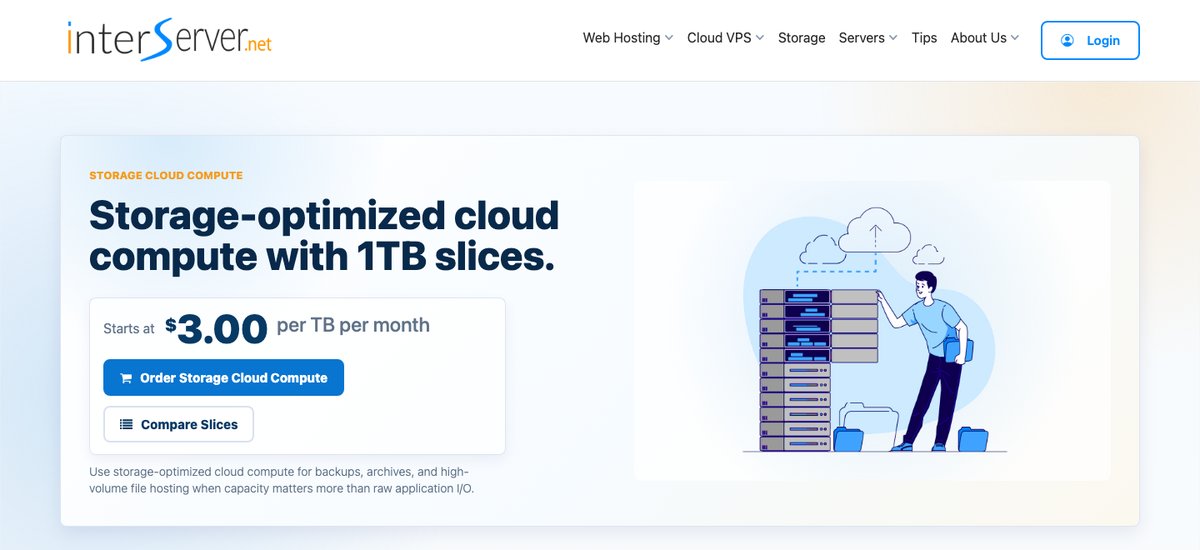
InterServer's Storage VPS is built for exactly this job. You buy storage in 1 TB slices at $3 per month each, and every slice also adds 2 GB of RAM and 2 TB of monthly transfer. Start with 1 TB and add slices as your data grows, up to 32 TB on one server.
The storage is SATA HDD capacity on ZFS arrays, not SSD. InterServer says plainly that this product is for backups, archives, and file hosting, not for databases or apps that need fast disk I/O. You get root SSH access to a Linux server on a 10 Gbps shared port, but no desktop or RDP. Storage can grow later, but most filesystems can't shrink without a reinstall, so add slices with care.
Billing is month to month with no annual discount, and there's no free trial or money-back guarantee on this product. Managed support is included from 8 slices up. You can deploy in Secaucus (New Jersey), Richardson (Texas), or El Segundo (California).
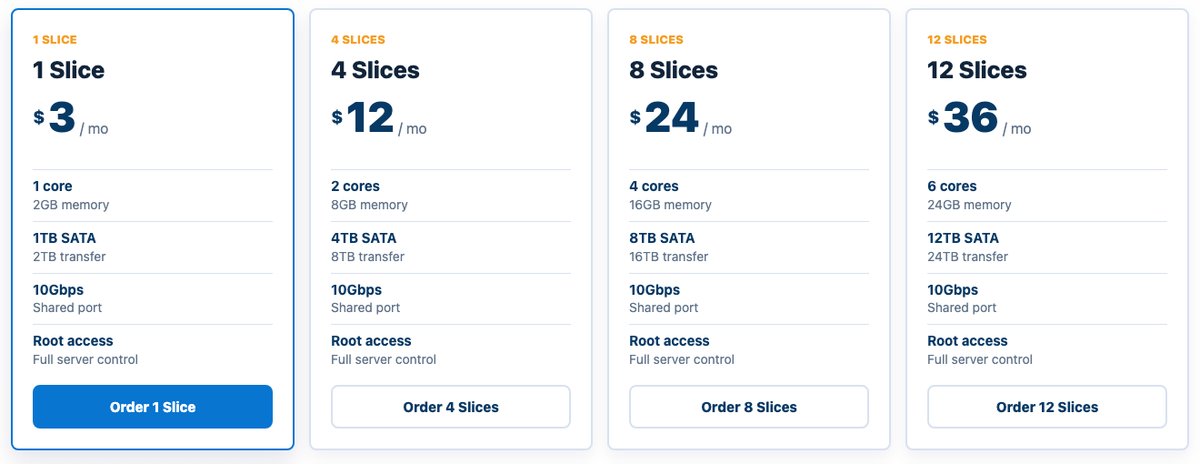
- Storage: 1 TB to 32 TB (SATA HDD)
- Backups: Not included (InterServer sells a separate Cloud Remote Backup service)
- Bandwidth: 2 TB to 64 TB per month on a 10 Gbps shared port
- Uptime: Not listed on the Storage VPS page
- CPU Core: 1 to 16 cores
- RAM: 2 GB to 64 GB
- Price range: $3 to $96 per month
#2 Contabo (SSD, Generous Storage on the Entry Plan)
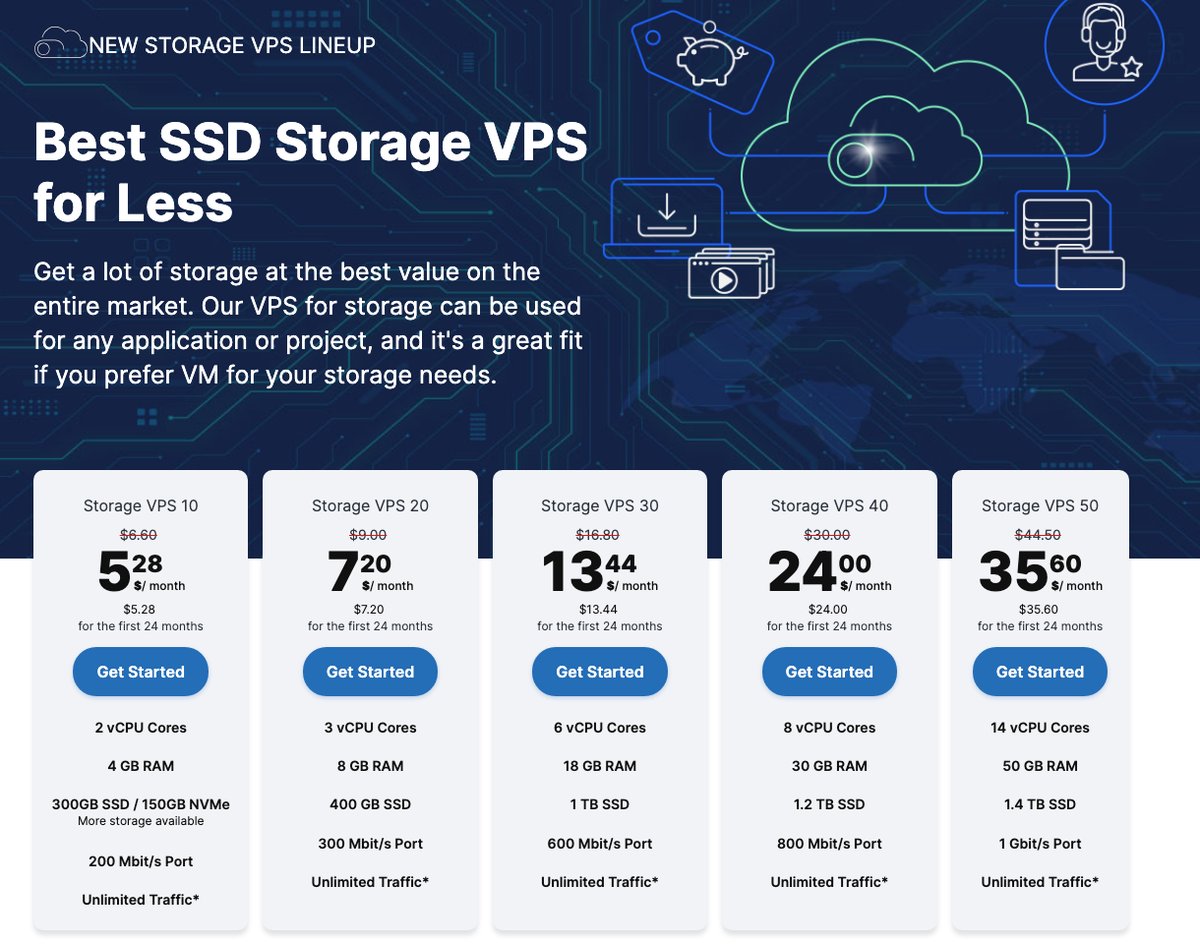
Contabo sells a Storage VPS line with a lot of SSD space for a low price, in 11 locations across 9 regions in Europe, North America, Asia, and Australia.
Incoming and outgoing traffic are unlimited under a fair usage policy, which helps if you move large files often.
Further, the server is fully customizable. You can choose your favourite OS and then set the server configuration as per your need.
Contabo uses SSDs rather than hard drives, so you pay more per terabyte than with InterServer or AlphaVPS, but disk access is faster. The listed prices apply to the first 24 months.
- Storage: 300 GB to 1.4 TB (SSD; the smallest plan can use 150 GB NVMe instead)
- Backups: Additional space available
- Bandwidth: Unlimited traffic (fair usage policy) on a 200 Mbit/s to 1 Gbit/s port
- Uptime: 99.9% with uptime monitoring
- CPU Core: 2 to 14 vCPU cores
- RAM: 4 GB to 50 GB
- Price range: $5.28 to $35.60 per month (first 24 months)
#3 AlphaVPS (HDD with NVMe Cache, Lowest Entry Price)
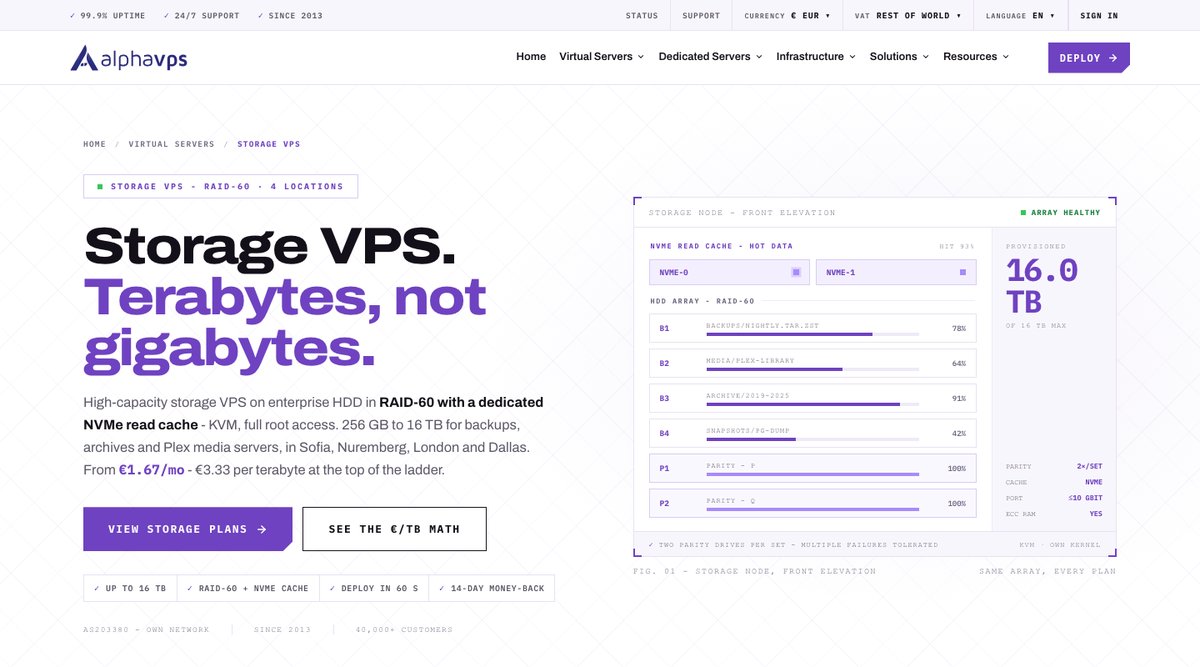
Want affordable KVM storage in Europe? AlphaVPS is a good fit. It has a premium network with tier 1 data centers.
RAID 60 HDDs with full root access are some great advantages of going with AlphaVPS. Plans start at 256 GB and go up to 16 TB, and every plan adds an NVMe read cache in front of the HDD array. You can deploy in Sofia, Nuremberg, London, or Dallas.
It’s based on KVM and is fully customizable. You can choose your OS and get started with the server.
Unfortunately, there are no backups taken. However, it’s not a big issue as the majority of such services don’t have automated backups.
You will have to take them manually if you want them. They also have 24/7 support. The support team is professional and can help with any questions.
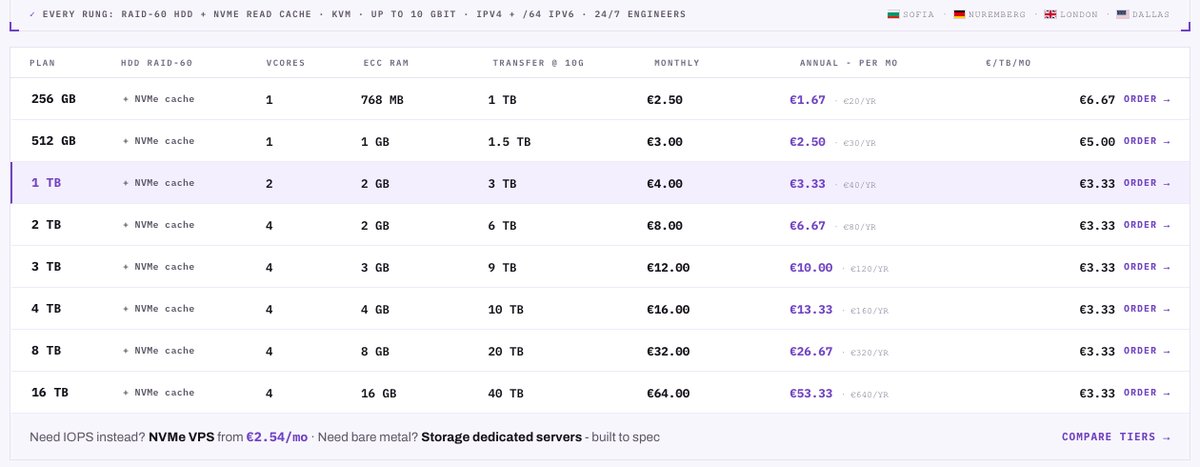
- Storage: 256 GB to 16 TB (HDD in RAID 60 with NVMe read cache)
- Backups: No
- Bandwidth: 1 TB to 40 TB per month (up to 10 Gbps port)
- Uptime: 99.9% (SLA)
- CPU Core: 1 to 4 vCores
- RAM: 768 MB to 16 GB ECC
- Price range: €1.67 to €53.33 per month on annual billing (€2.50 to €64 monthly)
#4 Cherry Servers (HDD with SSD Cache, Hourly Billing)
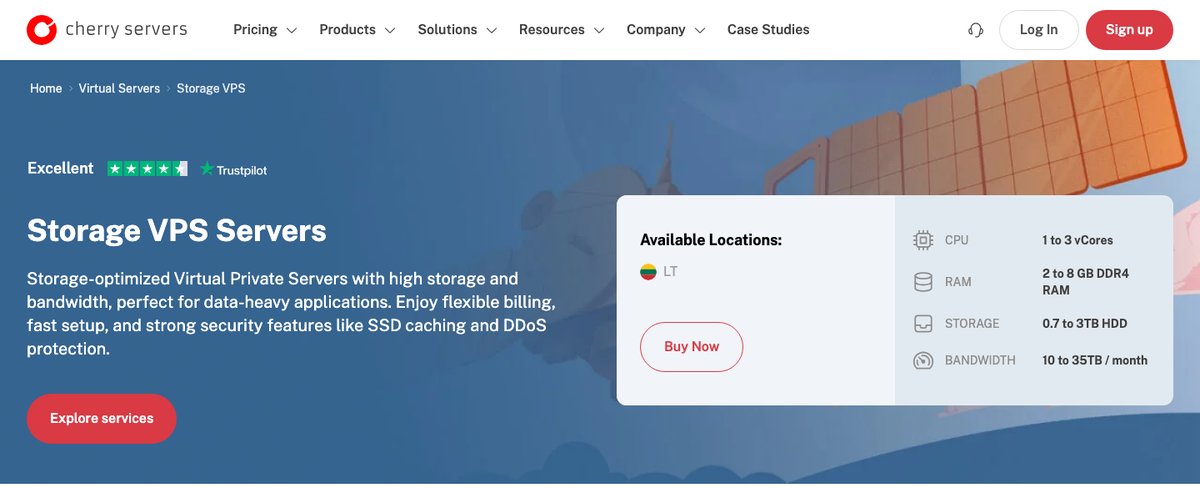
Cherry Servers is a Lithuanian provider, and its Storage VPS runs on KVM in its Lithuanian data center. The disks are HDD with an SSD cache layer on top, which speeds up reads of frequently used data while keeping the cost per terabyte down.
Plans go from 700 GB to 3 TB. The entry Storage VPS 2 costs $0.039 per hour, or from $18.90 per month, for 1 vCore, 2 GB of RAM, 700 GB of storage, and 10 TB of monthly traffic on a 500 Mbps port. That's far more per terabyte than InterServer or Time4VPS, but you get hourly billing, a full API, and large traffic allowances.
DDoS protection is included, and you can add up to 2 TB of backup storage. Cherry Servers accepts more than 20 payment methods, including cards, PayPal, and crypto.
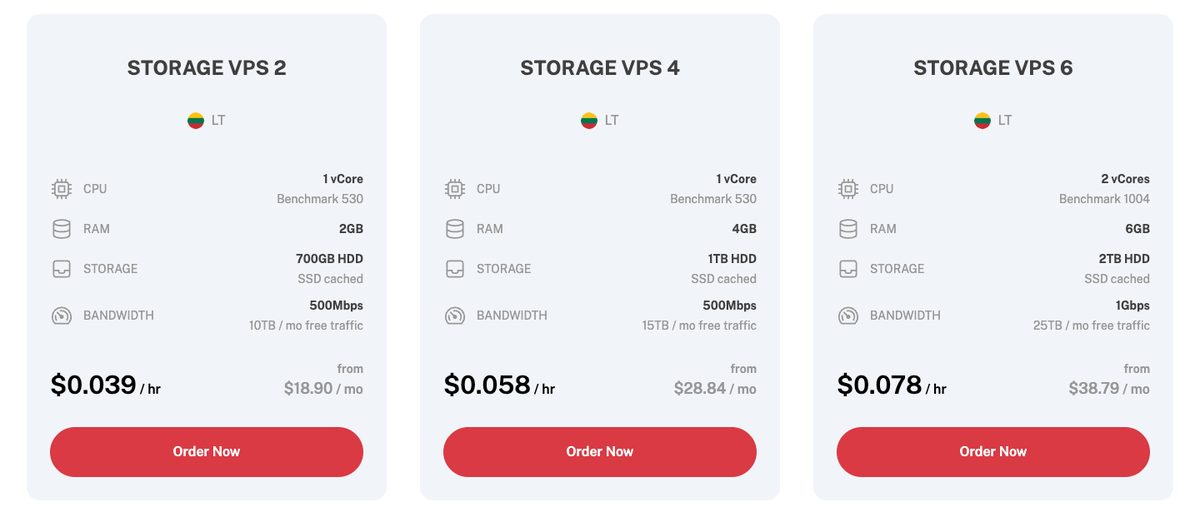
- Storage: 700 GB to 3 TB (HDD with SSD cache)
- Backups: Optional backup storage add-on (up to 2 TB)
- Bandwidth: 10 TB to 35 TB per month (500 Mbps to 1 Gbps port)
- Uptime: Not listed on the Storage VPS page
- CPU Core: 1 to 3 vCores
- RAM: 2 GB to 8 GB
- Price range: From $18.90 per month (or from $0.039 per hour)
#5 BitLaunch (SSD, Pay with Crypto)
BitLaunch's Storage VPS isn't a separate high-capacity product. It's the same KVM cloud server BitLaunch sells for everything else, on Intel Gold CPUs with SSD storage in RAID, and it scales up to 1,200 GB of SSD, 64 GB of RAM, and 10 CPUs. That suits a few hundred gigabytes of fast storage, not multi-terabyte archives.
What sets it apart is privacy. Sign-up needs only an email and a password, you pay with Bitcoin, Litecoin, or Ethereum, and billing is hourly from a prepaid balance.
Transfer is unlimited on BitLaunch's own servers in the Netherlands, Romania, and the UK. BitLaunch shows its prices only inside the control panel, so check the hourly rate for a large-disk server before you launch it.
You can also get a short free trial: BitLaunch's support adds enough credit for a few hours of use if you ask on live chat.
- Storage: Up to 1,200 GB (SSD in RAID)
- Backups: Not listed
- Bandwidth: Unlimited on BitLaunch's own servers
- Uptime: 99.95% (provider claim)
- CPU Core: Up to 10 CPUs
- RAM: Up to 64 GB
- Price range: Hourly, shown in the control panel after sign-up
#6 VPSDime (HDD in RAID 10)
VPSDime has a dedicated Storage VPS line built on HGST enterprise HDDs in RAID 10. A single failed disk can be swapped without downtime or data loss, and VPSDime says it doesn't oversell: the RAM and disk you pay for are reserved for your server, while the CPU and the 10 Gbps uplink are shared with other customers.
Plans run from 100 GB for $40 per year up to 4 TB for $56 per month. The 1 TB plan costs $14 per month with 4 shared CPU cores, 2 GB of ECC RAM, and 8 TB of transfer. That's a low price per terabyte, though not as low as InterServer's $3 slices.
The Storage VPS uses Virtuozzo/OpenVZ 7 containers, not KVM, so you run one of VPSDime's Linux templates (Ubuntu, Debian, CentOS, Fedora, openSUSE, or Red Hat) instead of your own kernel. New customers' orders are screened manually, which can add 10 to 15 minutes, and there's a 72-hour money-back guarantee. VPSDime runs six locations: Dallas, Seattle, Los Angeles, Piscataway (New Jersey), Maidenhead (UK), and Amsterdam.
| Shared CPU cores | ECC RAM | HDD storage (RAID 10) | Transfer | Price |
|---|---|---|---|---|
| 1 | 1 GB | 100 GB | 1 TB | $40/year |
| 2 | 2 GB | 250 GB | 2 TB | $60/year |
| 4 | 2 GB | 500 GB | 4 TB | $7/month |
| 4 | 2 GB | 750 GB | 6 TB | $11/month |
| 4 | 2 GB | 1 TB | 8 TB | $14/month |
| 4 | 2 GB | 2 TB | 12 TB | $28/month |
| 4 | 2 GB | 3 TB | 18 TB | $42/month |
| 4 | 2 GB | 4 TB | 32 TB | $56/month |
Source: VPSDime's Storage VPS page, checked October 17, 2026. Every plan has a shared 10 Gbps uplink and Intel Xeon Gold CPUs.
- Storage: 100 GB to 4 TB (HDD in RAID 10)
- Backups: No
- Bandwidth: 1 TB to 32 TB per month on a 10 Gbps shared uplink
- Uptime: 99.9% network uptime SLA
- CPU Core: 1 to 4 shared CPU cores
- RAM: 1 GB to 2 GB ECC
- Price range: $40 per year to $56 per month
#7 Time4VPS (RAID Storage, Up to 8 TB)
Time4VPS is a great service that you can use if you have fewer requirements. Plans start at 256 GB, and the Storage VPS runs on OpenVZ containers rather than KVM, so you can’t load your own kernel.
There are various plans from which you can choose. If you want to save some money, it’s the best choice you can go with. Every plan has a single vCPU, so it suits backups and file storage rather than CPU-heavy work.
The server can be scaled up to 8 TB and you can also go with 0.25 TB. They have a plan for the smallest requirements too.
You get complete root access to your server to control everything you want. To get a bigger discount, you can go with their annual plans.
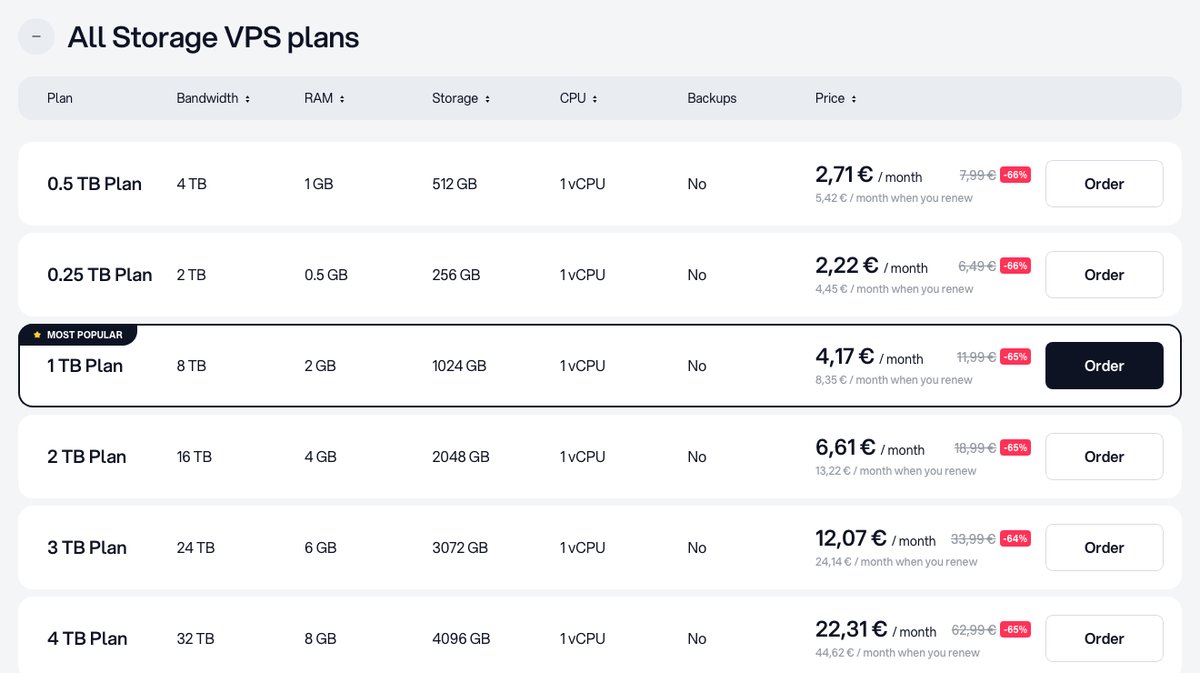
- Storage: 256 GB to 8 TB
- Backups: No
- Bandwidth: 2 TB to 64 TB
- Uptime: 99.95% (guarantee)
- CPU Core: 1 vCPU
- RAM: 0.5 GB to 16 GB
- Price range: €2.22 to €67.50 per month on a 2-year term (renewals cost about twice as much)
#8 Vultr (Object Storage, HDD Block Storage)
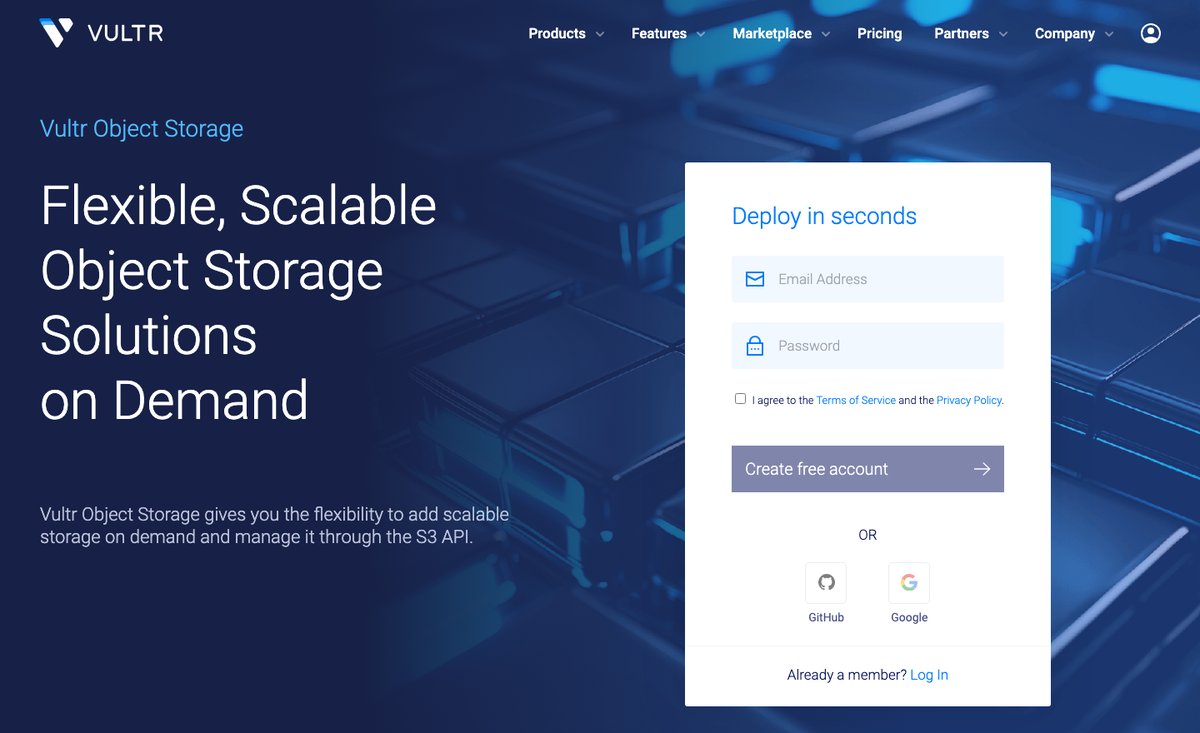
Vultr doesn't sell a storage VPS. Instead, it offers S3-compatible Object Storage that works with any server, plus HDD Block Storage volumes you attach to a Vultr cloud instance. Object Storage suits backups, media libraries, and archives you reach over the S3 API, while a block storage volume works like an extra disk on your server.
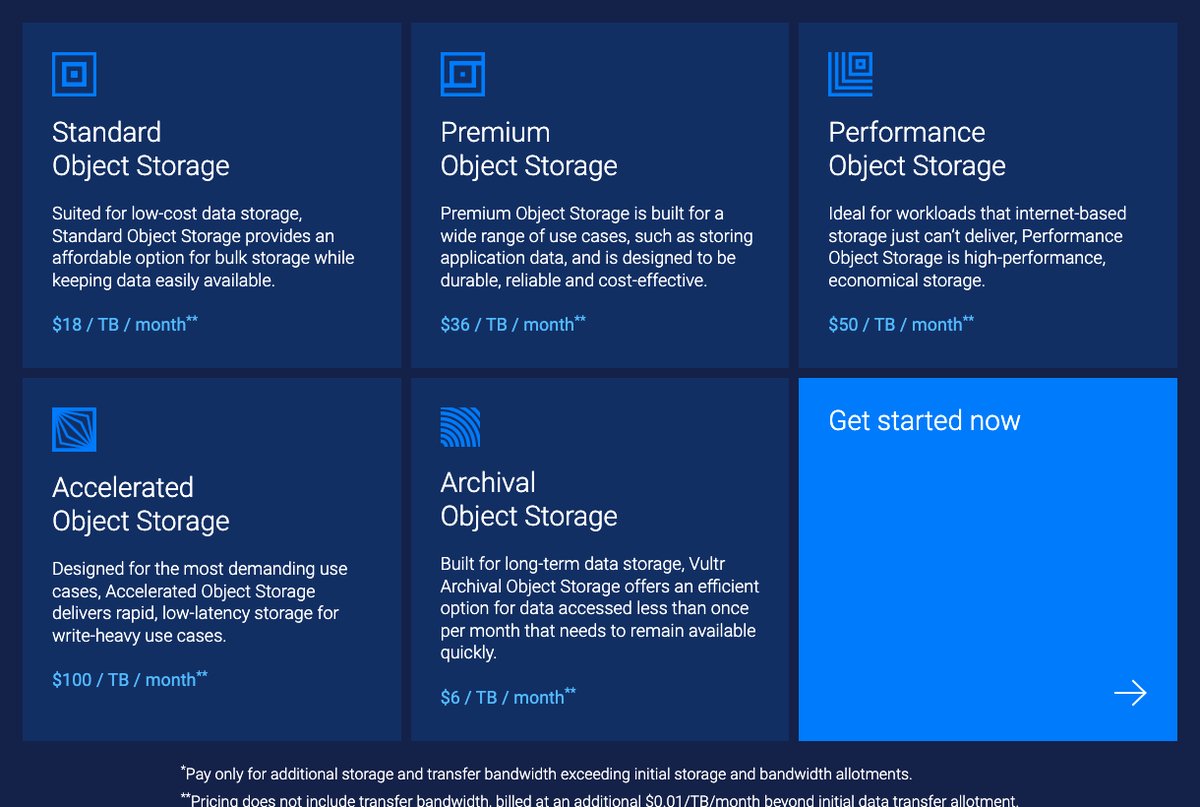
Object Storage is billed by tier. The Standard tier costs $18 per month and includes 1,000 GB of storage and 1,000 GB of outbound transfer, with extra storage at $0.018 per GB and extra transfer at $0.01 per GB.
The faster Premium, Performance, and Accelerated tiers cost $36, $50, and $100 per month, and an Archival tier starts at $6 per month for data you rarely open. Object Storage is available in 14 regions.
HDD Block Storage volumes start at 40 GB. Vultr's automatic server backups don't cover attached block storage, so plan your own backups for those volumes.
- Storage: 1,000 GB included on every Object Storage tier, extra billed per GB
- Backups: Not included for block storage volumes
- Bandwidth: 1,000 GB outbound included, then $0.01 per GB; inbound is unlimited
- Uptime: Not listed for Object Storage
- CPU Core: N/A (storage service)
- RAM: N/A (storage service)
- Price range: $6 per month (Archival) to $100 per month (Accelerated), plus extra usage
#9 Kamatera (Block Storage on SSD-Accelerated Disks)
Kamatera is a well-known cloud provider, and its cloud block storage attaches to your Kamatera servers. It uses a pay-as-you-go pricing model: you pay only for the space you use, billed by the minute on the same cycle as the server the volume is attached to. The control panel can feel complex to new users.
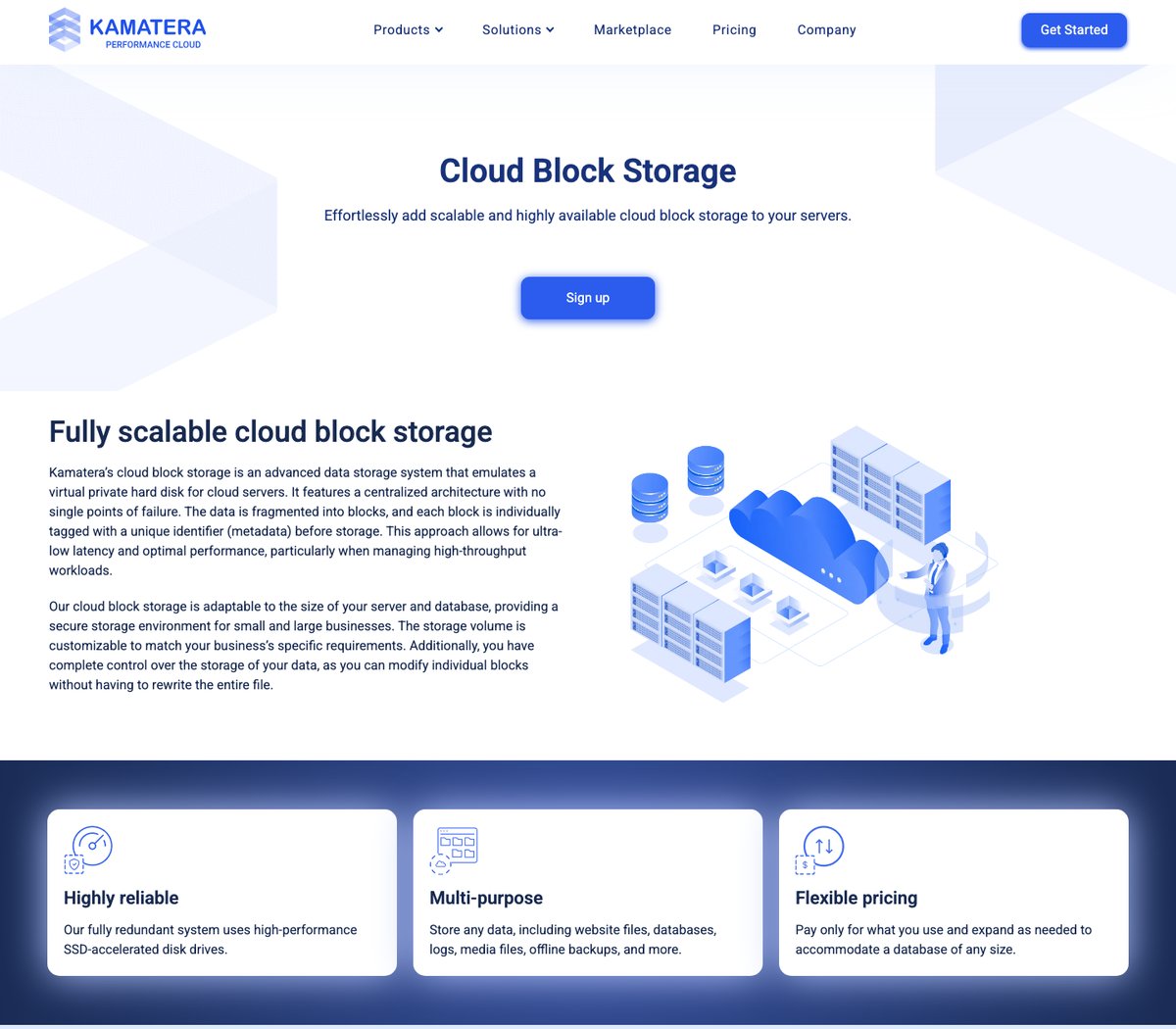
Please note that it’s block storage for Kamatera cloud servers, not a full VPS, and it runs on SSD-accelerated disks in a fully redundant system. Use it to expand a server’s disk, or to hold offline backups, media files, or databases.
- Storage: Pay-as-you-go (up to 20,000 IOPS per volume, no IOPS fees)
- Backups: Usable for offline backups
- Bandwidth: Set by the server the volume is attached to
- Uptime: Fully redundant system
- CPU Core: N/A (block storage)
- RAM: N/A
- Price range: $0.05 per GB per month (100 GB for $5)
What to look for when buying a VPS with high HDD storage capacity?
Wondering about the things you need to look for when you are getting a VPS with high HDD storage capacity? Here are the things to look for.
- Capacity: Capacity is the first thing to see (of course). You can see the maximum storage available and also see if there is additional storage available for the extra cost. You can also check the storage type (HDD, SSD, or NVMe).
- Bandwidth: Most storage VPS plans cap monthly transfer, port speed, or both, and a high-storage server needs enough of each to move large files.
- CPU/RAM: Don’t forget to check out the CPU cores and the RAM capacity. The RAM size depends on the storage.
- Special features: Special features include backups, security, and data center locations. You should see if there are automated backups or not. Most of the VPS have decent security. So, this is not something that you need to stress about. You can also see the data center locations if you have traffic from a specific location.
- Price: Always keep in mind the price before you go with the VPS. The pricing for the first invoice is less but the renewal charge will increase. So, keep your long-term vision in mind and plan accordingly.
- Scalability: You should see other plans as well. You might need to upgrade to more storage. See if there is any way to buy additional storage. This depends on the type and the amount of data you have, considering present and future plans.
- Uptime: In all this rush, don’t forget to look for the uptime. You don’t want the server to stop responding when you are at 99% progress on transferring big files
Final Words
To conclude, these were some of the best VPS providers with big storage capacity. You can go with any of these as per your choice. Make sure you keep in mind the things that we discussed in the end.
Always think of the long term and take the decision accordingly. The price mentioned here is for the first invoice.
The renewal rates will be higher in the majority of cases. So, keep that in mind.
Feel free to comment if you think I missed any.